
How to Build an AI Training Program for AEC in 2026
A 5-step framework for moving construction teams from AI curiosity to AI capability.

Note: this article is adapted from a presentation I gave at the AI in AEC conference in March this year called ‘From Curiosity to Capability: Upskilling Teams for AI Adoption in Construction.’
In conjunction with this article, we just published a free online course, AI for AEC Professionals in partnership with Kantiv. Designed specifically for the AEC industry, it shares how to use AI safely and compliantly, how to onboard AI on to your workflows, manage it like a junior teammate and apply it where it delivers the most value. View the full course here.
At the start of 2024, I was seconded from AECOM into a government infrastructure authority as an Innovation Advisor.
My role was to help design and deliver an AI Capability Uplift program and the reason why was that the innovation team had identified a pain point.
The business knew that AI would change the way in which they operate, but when they reviewed usage, they realised that people weren’t using AI for two main reasons:
Fear
Being a public authority employees were scared of doing the wrong thing, exposing data and losing their jobs.Lack of Training
Despite wanting to use AI, adoption was stalling as people didn’t know where to start or how to learn the tool.
I found the latter point interesting and when we dug in, a clear reason emerged:
Existing AI education content was consumer facing or industry agnostic. When it was tailored for AEC, it often lacked practical grounding in industry workflows and didn’t account for the more onerous security requirements that public organizationsrequired.
This meant that despite a desire to learn AI, people weren’t engaging as they felt the risks outweighed the benefits and they didn’t know where to start.
To address this gap we designed, delivered and operationalised an AI Training Program. That included designing and facilitating workshops, providing small group coaching sessions as well as developing an AI literacy framework and operationalising a series of workshops so the training could be run on demand.
In this article I’ll be drawing on my experiences and what I’ve learned since from peers in the industry on how to build an AI training program for construction in 2026.
It’s important as I believe the same challenge still exists.
While AI model capability is increasing, adoption and use is still lagging due to a lack of training.
Let’s dive in.
Contents:
How to Build an AI Capability Uplift Program
Step 1: Assess Capability
Step 2: Map Personas
Step 3: Train AI Literacy
AI Novices
AI Explorers
AI Practitioners
How the Program Runs (12 month cycle)
Step 4: Enable Continuous Learning
Step 5: Citizen Developers
How to Build an AI Capability Uplift Program
There are 5 steps to follow when designing a program. These are:
Assess Capability
The first step is to understand the existing AI literacy level of the organization and to identify any barriers to adoption that need to be addressed.Map Personas
Once you understand existing AI literacy levels, we need to segment the population into broad personas, generalizing their pain points and tailoring training needs.Train AI Literacy
The next step is to build and deliver the program, identifying the core, repeatable and scalable training areas and then progressively building advanced modules as organization capability increases.Enable Continuous Learning
Given the pace and improvement of AI systems, having a static training program is not enough. The organization needs to develop dynamic learning capability, creating communities, groups and information distribution systems to transfer knowledge outside of fixed training cycles.Develop Citizen Developers
This is the dream state for an employee. While not all will achieve this, a small number will become power users who, similar to the Excel Wizard / Excel Template Owner on a team, become the go to expert for AI in their discipline, managing and distributing new automations and skills.
By moving through these steps, organizations are able to build a capability program that is self-reinforcing.
This process not only allows us to increase AI literacy across the organization, but provide spaces and opportunities for power users to work cross-functionally.
It does require a backbone of AI experts (2-3 is fine) who can train employees and answer questions. These are often the innovation team members however these individuals can exist throughout the organization and are usually those who are most curious and excited about AI.
Let’s get into step 1.
Step 1: Assess Capability
Survey
The first step is to survey the organization.
That could be via an email survey, customer interviews or my favorite, bribery. I’d put a box of chocolates in the lunch room with surveys to fill out. It’s valuable as we would get honest responses due to the anonymity.
The survey should ask 4 key questions:
How often do you currently use AI tools?
That could be daily, weekly, occasionally or never. The goal is to understand the existing familiarity and use within the organization.
Do you use AI as part of your work today?
That’s Yes regularly, Yes occasionally, No, but interested or No, not interested.
The intent is to understand if we already have grassroots use of AI. It’s important to know from an AI literacy and familiarity perspective but also risk. If people are using it without the appropriate guide rails and understanding, it can impact security.
What is your biggest concern about using AI at work?
The choices are: Accuracy, Data privacy, Not knowing how to use it, Company policy, Job impact or other.
We use this to understand the adoption bottlenecks and proactively address these in our training program.
What topics would you most like to learn about?
This is an open question to understand where the pull demand is for topic selection and to identify the initial content to develop.
Results
From conducting these surveys, I’ve learned that while it feels like AI is here, the vast majority of organizations have quite low AI use.
The reason why is that most people don’t know where to start or they’ve tried AI but found it lacking. It’s usually because they’ve asked AI to complete a broad or complicated task such as writing a full inspection report which it naturally fails at. After this failure, many people discount its capabilities.
The goal of early training is usually focused on showing how and where to use AI so that employees can see immediate ROI. This in turn increases buy-in which is required to teach more advanced topics.
Step 2: Map Personas
After reviewing the survey results, we can begin to map the organization into broad personas correlated to AI literacy levels. Below is a standard framework which is representative for most organizations:
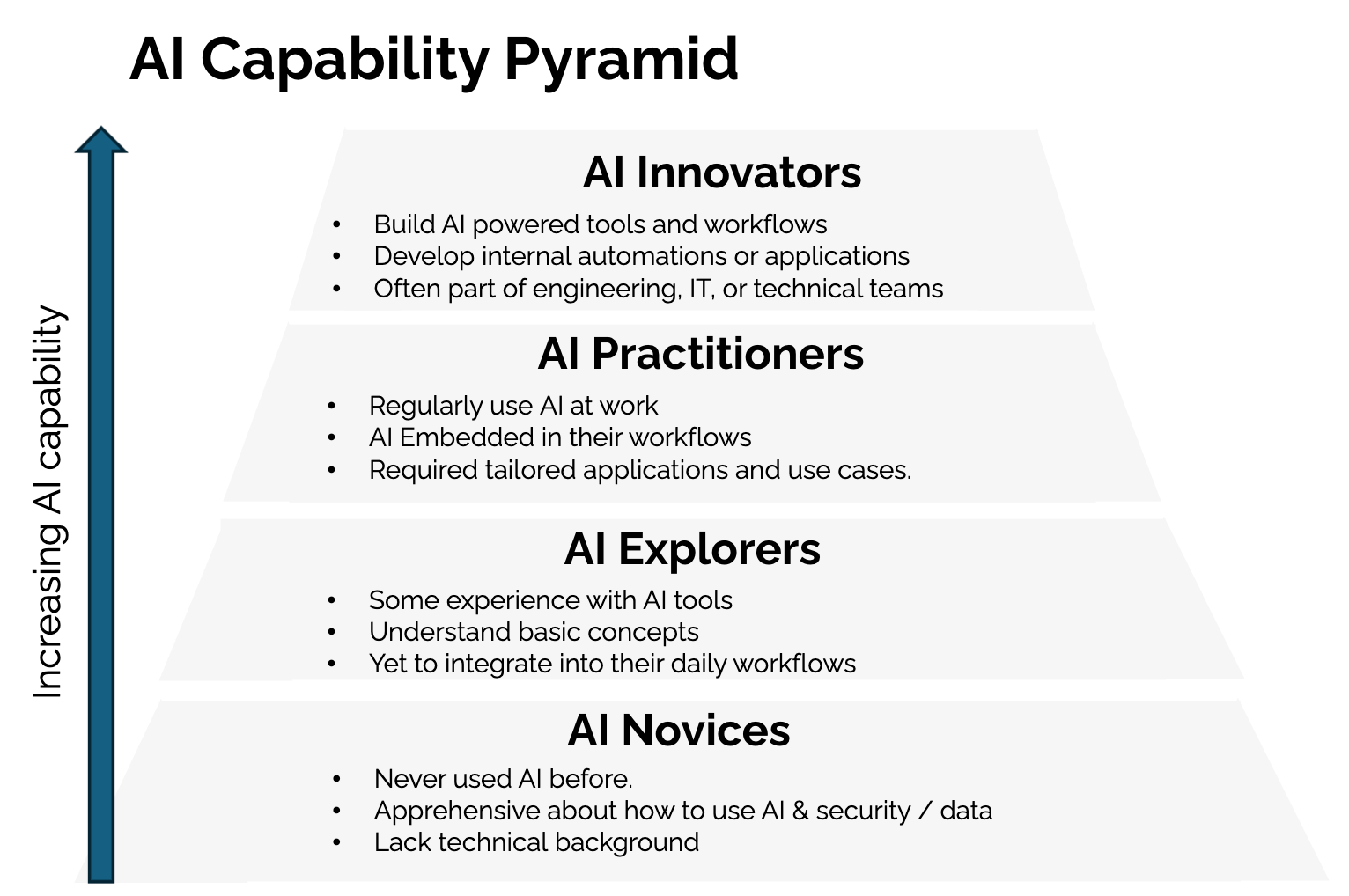
In the pyramid you can see each persona and their common characteristics.
The utility is that we can understand broadly where the organization sits and develop training which targets the largest group of employees. Our goal is to increase the capability level of each employee persona to a higher section of the pyramid.
What I’ve noticed is that the majority of organizations have employees primarily in the AI Novice category, who have either never used AI before or have limited understanding and are yet to try it in a work setting.
There are usually some AI Explorers who understand the basics of AI but are yet to use it in a repeatable or habitual way to complete their work.
Beyond this there’s often limited to no AI Practitioners or Power Users who are using AI consistently with automated tasks and workflows.
In addition we also have AI Innovators at the top of the pyramid who are those in the IT or Software teams that are building internal AI applications. They’re important to include and recognise, but generally sit outside of the remit of the AI Training Program given their software engineering and technical backgrounds.
In the next section I am going to explain how to develop training at each capability level including the learning outcome and the topics to cover.
Step 3: Train AI Literacy
On the right of the below pyramid, you can see the training options that can be provided at each capability level. This isn’t an exhaustive list but rather options which tend to resonate with employees.
Let’s first dive into the AI Novice level.
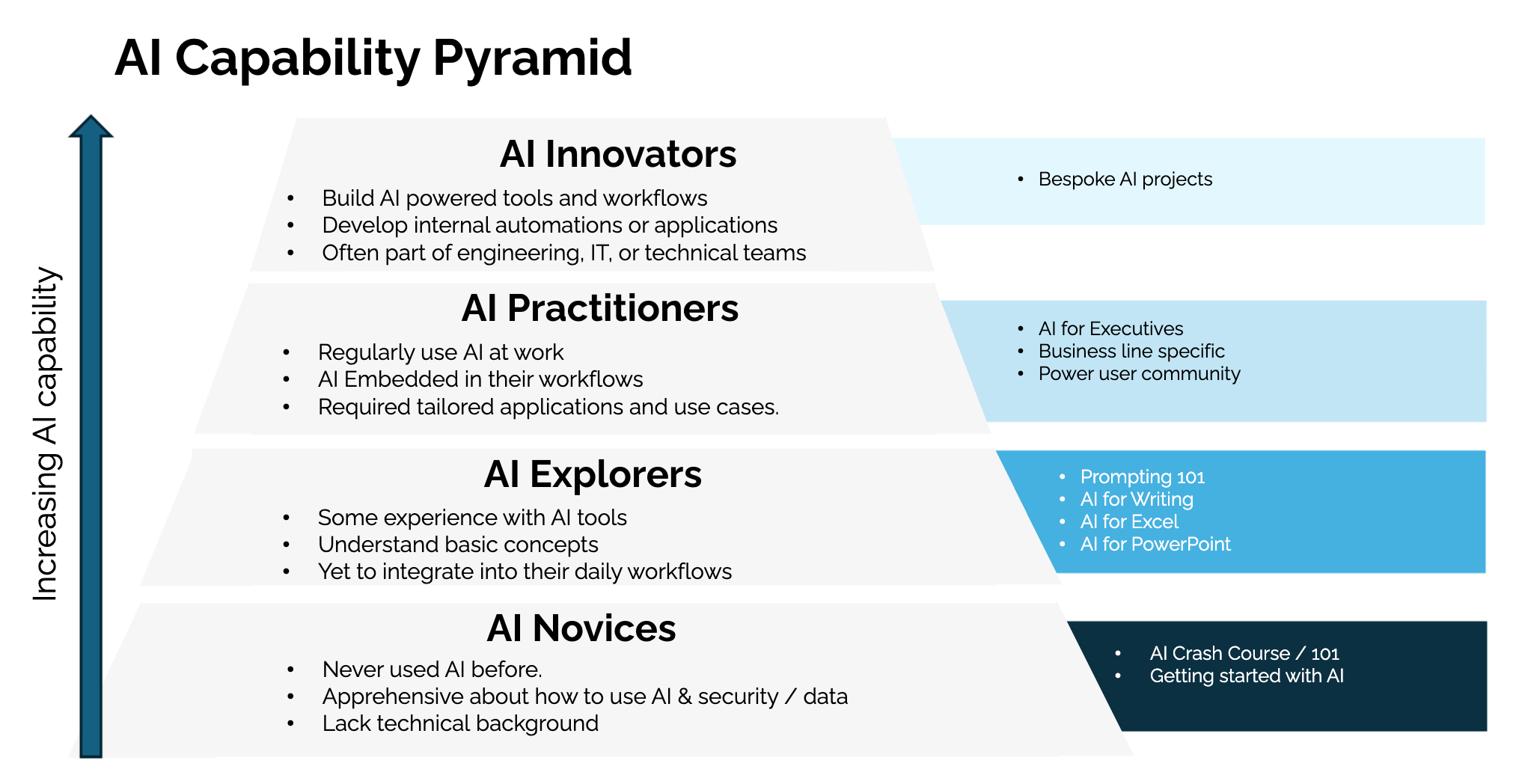
AI Novices
The majority of employees are usually in the ‘AI Novice’ category.
These are individuals who have never used AI before or are apprehensive about the risks and data security implications. It’s extremely common in AEC firms given the way we operate. Introducing a new tool or system in a workflow can impact safety or schedule, so we are taught to be incredibly mindful and diligent.
For this segment the goal is to help them to build confidence and understanding in AI to start experimenting in their roles.
The way we do so is by providing safe and structured use cases and guiding them through the signup process for AI tools.
Training
The training we recommend for them is ‘AI 101 / Crash Course.’ It’s a 2 hour workshop where we teach:
What AI is and how it works
It’s strengths and limitations
Share company usage guidelines
Provide practical everyday use cases
In this course we are able to proactively address barriers we learned from the survey. We highlight the company usage guidelines (what you can and can’t do) and shares AI’s limitations from hallucination to lack of AEC understanding. This provides the basis for use and helps learners understand when and where to use AI.
A framing I’ve used is:
AI is like a really smart intern. They are trained on the internet and know a lot, but they don’t have your context or experience. You need to understand their capabilities including when they need oversight and how to provide them feedback so they continue to improve.
Without you, the intern isn’t able to complete accurate work. And in turn, they’re able to save you time by completing work for you when provided with the correct direction and oversight.
At this stage we also highlight custom instructions which is a way for users to set persistent preferences, context, and formatting rules that AI applies to every conversation.
It’s helpful as now every time they use AI, it has the context on who they are, their role requirements and how they like to have outputs structured.
The second half of this training involves sharing AI use cases.
The way I do so is by highlighting AI capability areas or common use cases. These can be tailored your organization, but valuable options are:
Capability 1: Writing
How to draft, refine and polish reports or emailsCapability 2: Data Analysis
How to understand spreadsheets, create charts and generate complex formulasCapability 3: Thought Partner
How to work through problems, draft strategies or get feedbackCapability 4: Learning Assistant
How to explain new tools, walk through processes step by step or troubleshoot issues.
For each capability area we show case examples which are relevant to their roles and get learners to complete a task. That could be asking AI how to set up a Pivot Table in excel and having it walk them through the process step by step.
We deliberately begin with these as they’re horizontal capabilities. Almost every employee performs these tasks every day, allowing people to experience immediate value before introducing more specialized workflows.
In this way they are able to immediately see the value of the AI and how it could be used in their roles. They’ve now also signed up to an AI tool, set up their custom instructions and understand what they can and can’t upload.
To better understand the topics covered in this training, these are the related videos in our free AI course which are tailored to novices:
AI Explorers
Over time, your AI Novices will become AI Explorers.
They’ll have gained some experience with AI tools, understanding the basic concepts and possibilities. But they will have yet to integrate it into their daily workflows.
For this cohort, our goal is simple: How do we move from AI experimentation to a consistent workflow habit?
To do so, we offer use case specific training:
Training
The first step is to identify the most commonly used tools in the organization and identify ways in which AI could be used to automate or streamline workflows. There are two common training for AEC firms:
AI for Excel
In this training we show how to use AI to generate formulas, analyze data and troubleshoot spreadsheets.
It’s valuable as excel is the unofficial operating system of the industry. I’ve even seen teams write meeting agendas and minutes in Excel instead of Word.
I’ve also run this training when there hasn’t been a commercial AI license available, showing ways in which data can be anonymized so that it can be safely uploaded to receive insights from AI.
AI for Writing
This training is focused on how to use AI to draft emails, edit reports or improve clarity. We show how to use AI for text generation with human in the loop controls and prompts to use AI as an editor to sharpen your writing.
Given just how much writing we do in our day to day, small improvements here compound. This can be especially valuable as a significant proportion of the industry is immigrants with English as a second language.
The feedback I heard was how much time they saved not having to rewrite their emails or reports before issuing as they would primarily work as an editor.
[Optional] Prompting 101
Many people mention the need to teach prompting, the art of speaking to AI to get the desired response faster.
In my experience, it doesn’t make sense to teach prompting to AI Novices.
To understand the value of prompting, you first need to have tried using AI and notice its probabilistic nature. The same question can provide a different response with variations based on word changes.
At the AI Explorer level, people inherently understand this and we teach a variety of prompting frameworks which allows them to improve their overall efficiency when using AI.
To better understand what this Prompting 101 course could cover, these are the related videos in our free course:
AI Practitioners
Our third level is where things get fun.
These are people who regularly use AI at work, have it embedded in their workflows and are looking for tailored applications and use cases. They’ll be your AI champions and power users, constantly thinking of new ways to use AI and asking for help.
Training
For this cohort, it is less about training and more about awareness and collaboration.
Oftentimes they are the only person in their team or business unit who is passionate or a power user of AI. We want to enable and support that curiosity and excitement by creating Power User Communities.
These are online spaces such as Microsoft Teams chats or communities where people can share what they are learning and doing. It helps people feel less lonely or isolated when they are often being evangelical to their peers about AI.
Online communities can be incredibly challenging to get off the ground and the best way to do so is to seed conversations and build personal relationships. We do so by:
Starting Conversations
Everyday an Innovation Team member makes a post about an AI topic or use case to share with the community. This starts conversations, makes the online AI chats less empty (avoiding the cold start problem) and habitualizes checking the Microsoft Teams channel / community.AI Office Hours
Once a week we’d host Office Hours in the common area or lunch room where people come chat to us about AI. Often we would get AI Practitioners who would come with problems and we’d solve them together. These personal relationships anchored the community and kicked off real conversations as users met each other.
How the Program Runs (12 month cycle)
The choice of training content and frequency is dependent on the results of the AI survey conducted in step 1.
In the image below I’ve outlined how a program could run if the majority of employees are AI Novices.
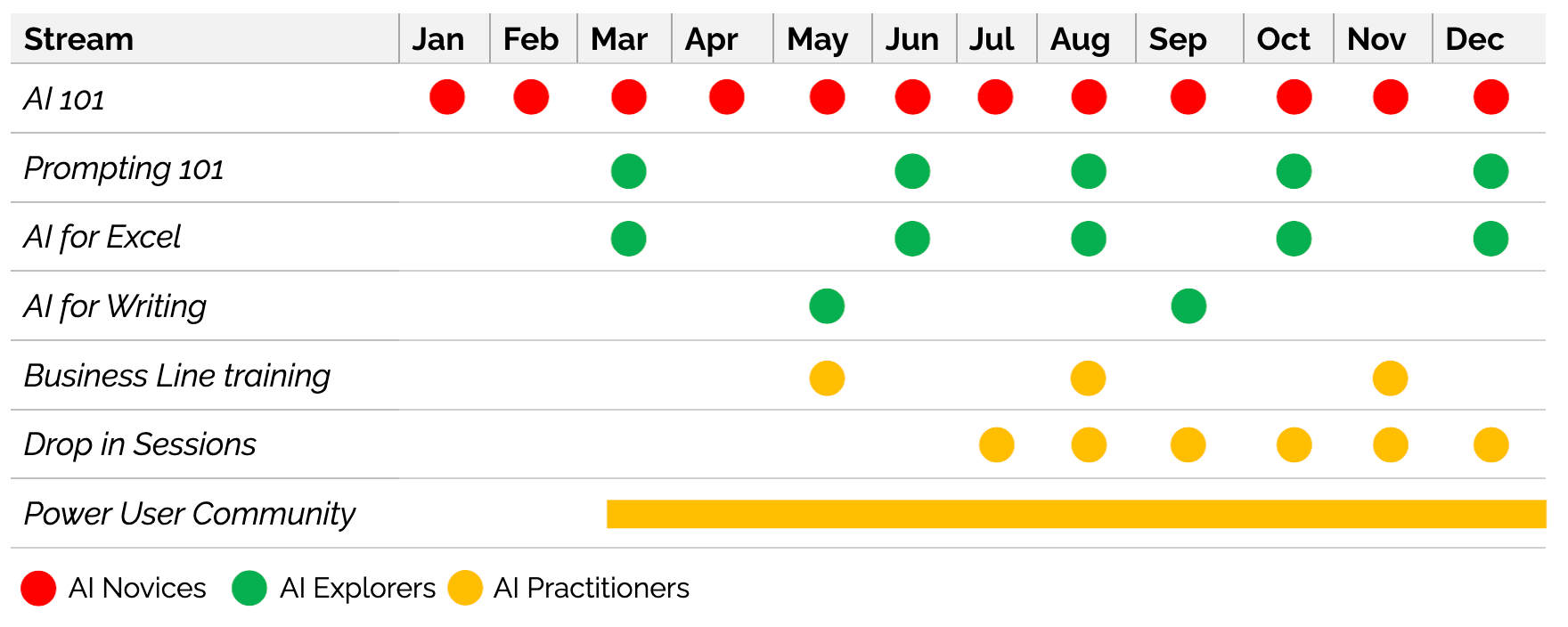
In this case we start with AI 101 training for Novices on a monthly basis. After around 3 sessions, a proportion will have graduated to become AI Explorers. We then run training for the Explorer cohort every 2 to 3 months.
After 5 to 6 months our AI Practitioners start to emerge.
We notice this as we begin to get pull demand from the business as our champions, who have been evangelizing AI training to the organization, request business line specific training to upskill their teams. At the same time we begin to host AI Office Hours or Drop in Sessions due to an increasing number of questions from the business.
I also want to note that the Power User Community has been kicked off in Month 3. We immediately want to start building up the community of engaged individuals who begin to operate as our AI Champions and who we can also use as focus groups to test new training concepts before releasing it to the wider business.
At this point most organizations believe the hard part is done. In reality, this is where the next challenge emerges.
Step 4: Enable Continuous Learning
At this step you’ll have set up an AI Capability Uplift program that’s graduating cohorts of employees.
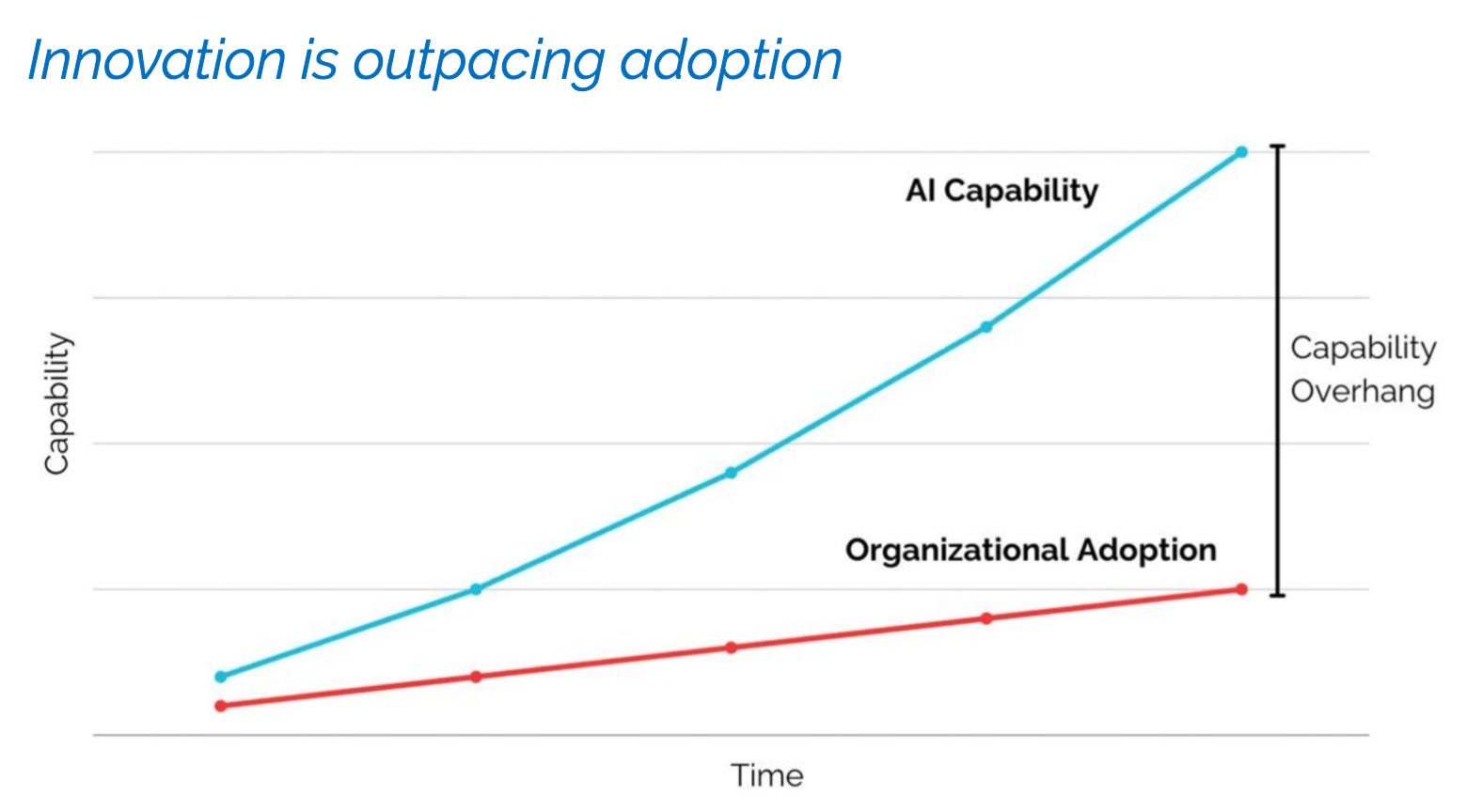
The challenge I noticed however is that the frontier model capability, the actions ChatGPT or Claude can undertake, was increasing exceptionally. It meant that even though we had training, there was a growing capability overhang — an extending gap between what AI could do and the capabilities of employees to know how to use it.
To overcome this, businesses need to have a dynamic way to distribute use cases relating to new AI features.
The way this can be done is by creating a community group of Power Users.
In each training program there would be 2 or 3 highly engaged users and who can be invited into the AI teams chat.
Whenever there is a new AI feature, the innovation team can share a high level outline and use cases to the power user community.
Given their level of interest and engagement I have noticed they usually have the following traits when new AI information is shared with them:
Fast Experimentation
As soon as a new piece of information dropped, they’d immediately start experimenting, identifying and sharing practical use cases.Local Workflow Adaptation
They’d start to adapt templates, workflows and datasets to reflect the new capabilities.Knowledge Diffusion
They’d be excited and tell their teammates about what was working, sharing tips and demonstrating new capabilities.
This provides a way to quickly diffuse innovations into the wider business and by understanding what’s resonating and being adopted, it provides insights on what future training should cover.
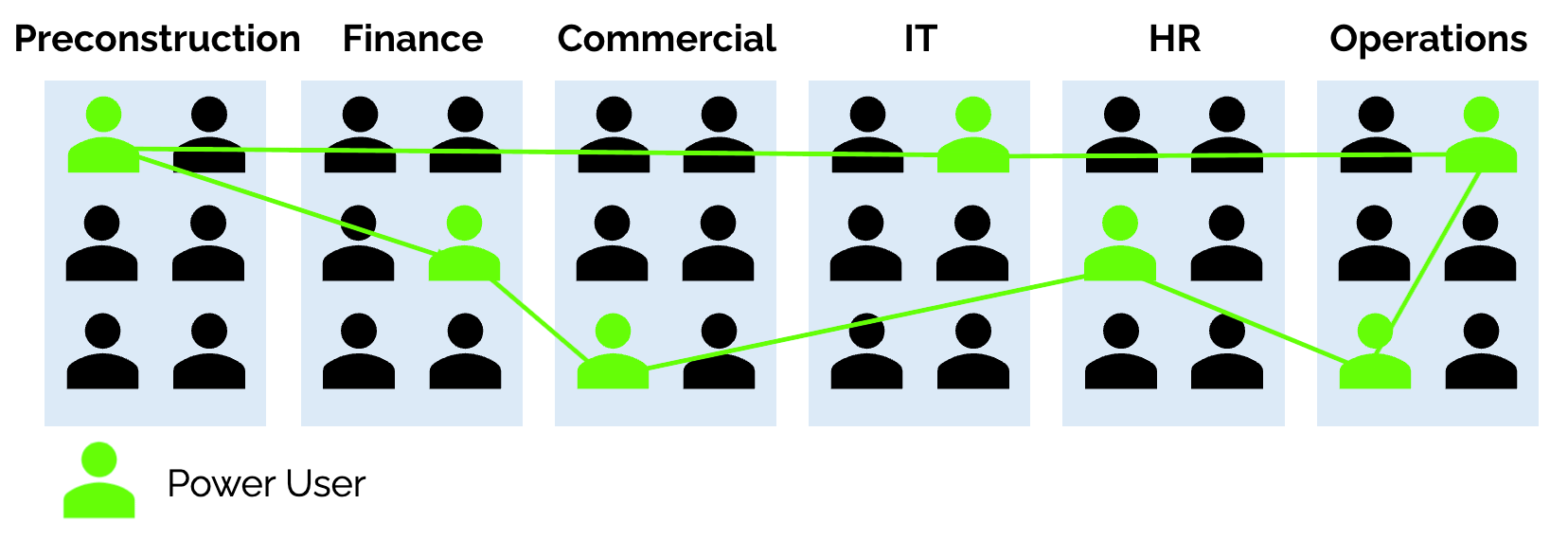
Interestingly, when these Power Users are mapped against the organization chart, they’re often distributed across a wide variety of teams. This is as it isn’t that specific teams are more AI curious, rather individual cross-functional traits lead to power users.
It means that the Power User community becomes a powerful way to distribute AI information across the business.
Step 5: Citizen Developers
The final stage is to help Power Users graduate into Citizen Developers.
These are non-IT employees who create business applications, automate workflows or analyze data using low-code or Generative AI platforms that are approved by IT. They are able to reduce IT backlogs and solve departmental problems.
Importantly, Citizen Developers should not operate outside IT governance.
The goal is not uncontrolled experimentation, but enabling trusted employees to solve localized workflow problems within approved systems and security boundaries. We don’t expect the majority of employees to become Power Users, rather a small subset have the willingness and ability to become multipliers.
The Power User group forms the core of this cohort and in combination with IT, can be provided with training and guidance on how to build internal applications. That could be how to vibe code an interface on top of an Excel spreadsheet or build an AI Chatbot using all the Project RFIs for use by project teams.
Given the capability of these individuals, they’re able to be the connectors on the ground, quickly solving and deploying new tooling and sharing it with their coworkers. Adoption is higher as people trust them and there is a fast feedback loop whereby bugs and improvements are deployed almost immediately.
When they need to complete more complex or higher value tasks, they are able to champion this with the IT team and often have the skills to develop a detailed Product Requirements Document.
The biggest misconception about AI adoption is that access to tools automatically creates transformation. In reality, most organizations are not struggling with model capability. They are struggling with adoption.
The challenge is rarely that employees refuse to use AI. More often, they lack the confidence, training, governance frameworks and practical examples needed to integrate it safely into their workflows.
That is especially true in construction and infrastructure where risk management, operational reliability and information security are deeply embedded into the culture of what we do.
Importantly, AI literacy is no longer becoming a niche technical skill.
It is increasingly becoming a core operational capability, similar to learning Excel or digital engineering systems.
Over the next few years, the gap between organizations that operationalize AI learning and those that do not will likely widen significantly as the ability to absorb, adapt and distribute new workflows will become a competitive advantage.
And the firms that build that learning capability early will be far better positioned to integrate the next generation of AI systems as they emerge and capture the productivity benefits as structural margin improvements.